Showing posts with label Lifestyle Tips. Show all posts

Wednesday, 17 July 2013

How to use New Gmail email categorization

new_gmail_categorizationHello friend are you know that gmail launch the new style of inbox to sort your email. Google today is introducing a new way to manage your Gmail inbox. This new view of your inbox puts a number of tabs at the top of Gmail’s inbox column. By default, Google shows tabs – and automatically categorizes your messages into them – for your social updates from sites like Google+, Twitter, Facebook or YouTube, promotions from the likes of Google Offers and Groupon, and a kind of catch-all “Updates” tab for your bills, receipts and similar messages.


So I Post the tutorial that how you use new inbox in gmail.
Steps :
1 . Open gmail account and you you new inbox like this.
new gmail inbox
So you find that there are three new tabs on the top Primary,Social,Promotional Now Gmail automatic set you mails according to his categories.you have to click on tabs to see the another category mails.

2. If you want to add new categories so click on + icon
select tab in gmail inbox
So here you see the two another categories Updates and forums After click on that button you get another two tabs.if you don’t want to categories your email just unclick all the tabs and you got your last inbox.


3.. In this image you will see that how to manage your new inbox.There are two arrows in this arrows I drag the mails to the another category so if you want to send you mail to another category you have to drag mails in category tab.
drag mails to category in gmail

Friday, 11 January 2013

How to reload tabs automatically in your web browser


Some websites and services refresh their contents automatically in intervals if you allow certain scripts to run on them. This is for instance the case on Twitter where new messages are displayed on top when they appear on the site. The majority of websites and services on the other hand do not offer a feature like this even though you sometimes might want to make use of it. Maybe you want Reddit’s frontpage to be reloaded regularly so that you notice new stories that have been published on the site, or you want a search on eBay to be refreshed so that you spot new items immediately.

The following guide describes how you can use auto reload features in Mozilla Firefox, Google Chrome, Opera and Microsoft Internet Explorer.

Opera
Reload tabs automatically in Opera


I’m starting with Opera because it is the only Internet browser of the four included in the guide that ships with a native auto refresh option. To reload a tab in Opera simply right-click anywhere on the website and select the Reload Every option from the context menu. Here you get options to reload the page every 30 minutes, 1,2 or 6 hours, never, or a custom range which can be as low as once every second.

The custom option has a setting that you can check so that Opera only reloads the page if the page contents are expired on the web server.

Internet Explorer
Reload tabs automatically in Internet Explore


There are not many plugins or extensions available for Internet Explorer, but Auto Refresher for IE is making available the functionality to Microsoft’s browser. Just download the add-on from the developer website and install it on your system. Next time you start Internet Explorer you will see a prompt that asks you whether you want to enable the plugin in the browser which you should accept.

You can alternatively click on the settings button and select Manage add-ons from the context menu to enable it at a later point in time.

The plugin adds a toolbar to the browser that you can click on to enable a preset or custom refresh interval.
Google Chrome
Reload tabs automatically in Google Chrome
Auto-Reload for Chrome can refresh a web page in select intervals. The extension has a second feature that may make it interesting for some users. It can randomize the reload which may be interesting if the page has a bot protection or if you need to simulate access by real users. Note that the extension displays ads every now and then which you can disable in the settings in the web browser.

You can enable an active time range there as well so that the extension is only active during that period of time.

Mozilla Firefox
Reload tabs automatically in Mozilla

Tab Auto Reload is one of the many add-ons for Firefox that add an option to automatically refresh websites in the browser. Once you have installed and restarted Firefox you can make use of the add-on either with a right-click on the tab that you want the add-on to reload automatically, or by dragging and dropping the icon it makes available to one of the toolbars of the browser.


Monday, 26 November 2012

10 SIMPLE WAYS TO SAVE ELECTRICITY,Reduce Electricity Bill

Day by Day the electricity price rising and there is very big problem to pay bill with this competition life so today i share the 10 tips which helps you to Reduce your electricity bill..
Tips-to-save-electricity

1.Replace all incandescent light bulbs with modern energy saving light bulbs. The energy saving bulbs are now available in a large variety of forms and sizes, so it is easy to choose the one that suit perfectly your needs and tastes. They are more expensive to buy, but they last up to 10 times more than a regular light bulb. By replacing all your bulbs, in a two-bedroom house you will save 5-10% of your electricity bill. At first glance, it might not seem much, but it adding to the other methods, you will feel the difference in your pocket. In addition, switch off the lights if you don’t need them: in a regular house you can save about 100$ a year, just from switching off the lights when you don’t need them.

2.You could invest in green energy, as the cost will pay off in a few years. Consequently, you can heat water by installing solar panels on the roof of your house, or generate electricity by installing a wind turbine, if you live in an area with strong and steady winds.

3.Boil just enough water for your needs. If you want to make a cup of coffee, do not boil more waterthan necessary. Strange as it might seem, it will make a significant impact on your electricity bill.

4.Unplug the mobile charger, after you have finished using it. After you have disconnected it from your mobile phone, it will still consume energy, so unplug it as soon as your phone’s battery is fully charged.

5. Do not leave any of your appliances on stand-buy, as they will drain a lot more energy as compared to turning them off. Many people tend to use their computers or TVs for several hours, and then put them on stand buy mode for the rest of the day, thinking that they aren’t consuming energy. This is a false belief, as the appliances still drain a lot of energy. Turning them off will make a great impact on your electricity bill – around 5-10% a month.

6.Take into consideration replacing your air conditioners  with fans. Air conditioners keep the air cool, but at a high cost: they are the biggest electricity consumers in your house. Install fans and use them alternatively with the AC units, or at least try to set up the thermostat as high as possible. Remember that air conditioners will consume 3% more energy, for each degree under 80º F / 26º C you set the thermostat.

7.Use the dishwasher only when it is full, otherwise use the half-load or economy setting. In addition, you don’t have to set the temperature high for your washing machine, as detergents are designed to clean clothes and dishes also at lower temperatures. This will reduce the electric bill, but also save water and detergent, all you have to do is to be methodical.

8.Pull off the curtains, paint the walls and ceiling in warm colors as to let the sun light in. In this manner, you will both save a little more electricity, and have your house bright.

9.Make sure your refrigerator, air conditioner units and other intensive electricity-consumers are working properly. If they are broken, call a qualified professional to get them fixed, or buy new energy efficient appliances.

10.When you go of your house for a long period of time, on holiday or on a business trip, make sure you switch off all lights and unplug as many appliances as possible. In this manner, you will save energy and protect the environment from useless consumption of electricity.

Thank you for reading our tips on how to save electricity and we recommend you to check out the rest of our articles regarding ways to save money. Please share our articles with your friends, by using the social media widgets.

Saturday, 3 November 2012

Traditional Home Decorations For Diwali


There are a number of traditional decorative items used by Hindus during Deepavali to decorate their homes.

In addition to giving a bright look to the house, the decor also brings a great festive feeling. Traditional Diwali decor adds to the joy of the occasion and is one of the many related activities that mark the Festival of Lights.

Diwali Diyas:
Since Diwali is called as the festival of lights, diyas will form obviously part of your home decor. Diyas are small lamps made up of clay which are filled oil or ghee as a source of fuel.

Candle wax can also be used in the form of aluminum diyas. These vibrant diyas are available in various designs and have good luck symbols painted on them which can include the “Om” or “Swastika“.

Diyas can be decorated with sequins, beads, minakari work, and different traditional motifs for Diwali decoration. Colorful flower shaped diyas bordered with beads and sparkling gold can beautifully decorate your home for this event.

Panchmukhi floral diyas with Lakshmi and Ganesha idols embedded on them can add a special touch to your decor. You can place diyas on the steps of your residence to welcome visitors into your home.

Diwali Lanterns And Candles:
Aromatic candles and lanterns often known as the ‘Aakash Kandil‘ can be used to decorate your home for Diwali. It’s not just that the candles illuminate your home, but these also create the perfect atmosphere for a festive celebration.

Floating candles are stored in pots filled with liquid or water and can be decorated with petals of flowers or even rose to add the artistic look. Sparkling flowers plus candles add beauty to your home.

One of the best ideas for Diwali decoration is to go in for wax designed, mirror studded and adorned candles with colored stones and sparkles. They are perfect for adding light and beauty to your home.

Diwali Rangolis:
Rangoli paste is made from rice flour, colored chalk and crushed limestone. Rangoli is used to enhance the beauty of your home during Diwali. Common themes used in Diwali rangoli include sacred symbols like “Swastikaa“, “Shree“, “Mangal Kalash“, “Deepak” etc.

The Goddess Lakshmi figure sitting on a lotus is often depicted with rangolis. Figures of animals, geometric patterns, and natural images such as flowers and trees can also be included in these rangolis. To add special effects to these rangolis, you must place the candles and diyas at specific positions on them.

Torans and Wall Hangings:
Attractive Torans that come with marigold flowers and mango leaves form a great Diwali decoration that gives a colourful look to your home and brightens up the decor.

They are often used to decorate the entrance of your home. Torans decorated with beads, bells, and mirrors are fashionable items that help you decorate your entrance with style.

Wall Hangings:
Wall hangings that have a picture of Lord Ganesha and Goddess Lakshmi add to the decor of your home during Diwali. Wall hangings, combined with ethnic motifs and embroidery work, add to the charm of the Diwali decor.

An elegant wall hanging can have an image of Lord Ganesha made of white metal and decorated with shades of green and orange to give that special touch to your decor.

Apply the above decorations to your home this Diwali with new and creative ways that add to the festive fun.

 content by Naaree.com

Wednesday, 31 October 2012

Secure your home using a webcam for free


Secure your home using a webcam for free
Security is of prime importance to everyone of us and we want our things to be secured even when no one is around them.
You enjoy the feeling of freedom when you know that everything around you is safe and secure.  Have you ever thought of setting up a surveillance system using just your computer and the webcam?

TNLsoftsolutions is providing a very unique and cheap way of setting up a security system purely based on a webcam.  The free software - Sentry Vision Security, they offer, has many great features only boasted by their paid counterparts.


Following are some of the features of the software :

  • Motion detection
  • Motion alerts (text msg, and E-mail)
  • Motion alarm
  • Hidden mode
  • Auto startup on Windows login
  • Time stamp
  • Multiple Camera support
  • Saves recordings as WMV video files
  • Records audio from microphone
  • Webcam broadcast (View/Control your webcam online. Smart phone compatible)
  • Remote control with simple text msg or E-mail commands
  • Scheduler to turn on/off Sentry Vision features at specified times 

Please Share us and like this post


Sunday, 28 October 2012

12 Tips To Save Petrol special Nicejattz Post

 12 Tips To Save Petrol
 12 Tips To Save Petrol
Hello friends Petrol price rising day by day.and its too difficult to manage your expensive with our income.Now i am going to tell you how to increase you bike mileage and save petrol.you can save 20% to 30% .so if you like our this post please share us and visit us daily.
We Provide 12 best Tips to save petrol.
Read Also : How to increase bike mileage or Average.


1 ) Pump up your tyres
Keeping your tyres inflated is one of the easiest and most important things. Saving petrol means saving money one can do to improve fuel economy.

If a range is recommended by the manufacturer, the higher pressure should be used to maximize fuel efficiency. Deflated tyres run hot and jeopardize safety. It will also cause the tyres to wear out prematurely, affect the vehicles adversely, and hurt the fuel economy by increasing the rolling resistance.

Tyres lose about 1 psi pressure per month due to air loss caused by the tyre hitting holes, bumps and kerbs. Therefore, the tyres should be checked at least once a month. Just 1 tyre deflated by 2 psi will result in a 1% increase in fuel consumption.

2) Drive at moderate speed
Avoiding high speeds on open roads resultsin safer driving and better fuel economy. In highway driving, over 50% of the power produced by the engine is used to overcome erodynamic drag. Drag and thus fuel consumption increases rapidly at speeds above 90km/h. On the average, a car uses about 15% more fuel at 100km/h, and 25% more fuel at 110km/h compared to when it is doing only 90km/h.

However, this should not lead one to conclude that the lower the speed, the better the fuel economy - because it is not. The fuel consumption of an average car increases sharply at speeds below 50km/h.

3) Clean the air-filter regularly
Clogged air filters increase fuel consumption by restricting airflow to the engine, and thus should be cleaned/replaced when necessary. Clogged air filters can increase fuel consumption by up to 10%.

4) Use thinner tyres
Tyres with thick width will improve the handling of your car. However, it will also increase your car's fuel consumption. Thicker tyres mean more rolling resistance! , and thus will consume more fuel.

5) Start up the car properly
With today's cars, it is not necessary to prime the engine first by pumping the accelerator pedal repeatedly.Do not crank the engine excessively This only wastes fuel.When starting the engine, idle it no more than 30 seconds to warm it up. An engine will warm up faster on the road. However, avoid sudden acceleration before the engine has warmed up sufficiently.

6) Drive in high gear (overdrive)
The engine runs most efficiently between around 1,500 and 2,500 rpm. To maintain these low revs you should change up through the gears as soon as practical and before the revs reach 2500 rpm.

For automatic transmission cars, you should always switch on your overdrive to help save fuel. Overdrive will allow your engine to change gears at lower revs. It also puts your transmission into an "economy" mode and lets it engage the final "overdrive" gear when cruising to ! keep the rpms extra low, thereby increasing fuel economy.

7) Travel light
Avoid carrying any unnecessary weight in your car. On the average, every 50kg added load in your car will increase fuel consumption by 2%.

8) Anticipate traffic ahead
A driver can reduce fuel consumption by up to 10% by anticipating traffic conditions ahead and adjusting the speed accordingly, and avoiding tailgating and thus unnecessary braking and acceleration.

Accelerations and decelerations waste fuel. Braking and abrupt stops can be minimized by not following too closely and slowing down gradually when approaching a red light. It takes up to six times as much fuel to move a car from a dead stop than it does for one moving at just a few km/h.

9) Avoid strong acceleration
The fuel consumption remains at a minimum during steady driving at a moderate speed of about 90km/h. Keep in mind that every time the accelerator is hard pressed, t! he engine goes into a "fuel-enrichment" mode of operation that wastes fuel.The vehicle should always be gradually and smoothly accelerated. Using cruise control on highways can help maintain a constant speed and reduce fuel consumption.

10) Minimise aerodynamic drag
Additional parts on the exterior of a vehicle such as roof racks and spoilers, or having the window open, Roof racks are bad for fuel economy increases air resistance and fuel consumption, in some cases by over 20%.

11) Don't let your engine idle
Minimize fuel wasted in idling by stopping the engine whenever your car is stopped or held up for an extended period of time. Idling more than a minute consumes much more fuel than restarting the engine. By having the engine switched off, you will save more fuel than is lost from the burst of fuel involved in restarting the engine. The net increased wear and tear from this practice is negligible.

12) Use the air-con sparingly
Air conditioners can use about 10 per cent extra fuel when operating. However, at speeds of over 80 km/h, use of air conditioning is better for fuel economy than an open window
Please share us for support us

Saturday, 27 October 2012

Power Up Your Desktop with Pokki

Pokki is one of the newer and more impressive applications in the technological world. This is an installer that allows computer users access to a range of web apps from their PC without too much trouble. Pokki has been extensively developed, but they are still urging developers to get on board to help develop further. There are plenty of features available to computer users with a few simple clicks of a button.


Installation of Pokki

There are lots of basic video demonstrations of the installation process. The installation process is incredibly simple and even the less technical computers will not have any problems installing it quickly and easily. Pokki is an application that can be installed by anyone and used by anyone! Pokki is certainly one of the easier applications when it comes to the installation process.
Pokki in use


The ease of use relating to applications is something that gets a lot of focus. The Future of Web Apps conference is one where people can get to grips with the best and newest web apps and applications. One of the sponsors of the event was Pokki, promoting the launch of their new product, which is likely to be a huge hit with all people that love technical gadgets.

Using the Pokki application is incredibly easy. With step by step instructions related to the installation and general use of the application, it’s hard to take a wrong turn. In fact, video sites like YouTube already have some in depth instructional videos for anyone that is having problems.

The main problem that people are finding is that the range of operating systems supported is not particularly extensive. For the moment, the Pokki application will only be installed on PCs using the Windows operating system. Over time, Pokki is looking to release new versions of their application, which will hopefully support operating systems such as the older versions of windows and of course; OSX.


The construction of the Pokki setup is what makes it really easy to use. Using a combination of HTML5, CSS3 and JavaScript, the application can do everything it needs to impress users. That being said, the app also provides enough flexibility so that new developers can be getting involved. Items like FaceBook, Gmail and Twitter are all easy to use using the Pokki application. Of course, there are plenty of other applications that can be run using the Pokki application; it is simply down to personal preference.

Pokki official site is in downlinks or click here

How to Create strong passwords.

A strong password is an important protection to help you have safer online transactions. Here are steps you can take to create a strong password. Some or all might help protect your online transactions:


  • Length. Make your passwords long with eight or more characters.
  • Complexity. Include letters, punctuation, symbols, and numbers. Use the entire keyboard, not just the letters and characters you use or see most often. The greater the variety of characters in your password, the better. However, password hacking software automatically checks for common letter-to-symbol conversions, such as changing "and" to "&" or "to" to "2."
  • Variation. To keep strong passwords effective, change them often. Set an automatic reminder for yourself to change your passwords on your email, banking, and credit card websites about every three months.
  • Variety. Don't use the same password for everything. Cybercriminals steal passwords on websites that have very little security, and then they use that same password and user name in more secure environments, such as banking websites.
There are many ways to create a long, complex password. Here are some suggestions that might help you remember it easily:
What to do
Example
Start with a sentence or two.
Complex passwords are safer.
Remove the spaces between the words in the sentence.
Complexpasswordsaresafer.
Turn words into shorthand or intentionally misspell a word.
ComplekspasswordsRsafer.
Add length with numbers. Put numbers that are meaningful to you after the sentence.
ComplekspasswordsRsafer2011.

More strategies for strong passwords
Test your password with a password checker
A password checker evaluates your password's strength automatically. Try secure password checker.
Avoid common password pitfalls
Cyber criminals use sophisticated tools that can rapidly decipher passwords.
Avoid creating passwords that use:


  • Dictionary words in any language.
  • Words spelled backwards, common misspellings, and abbreviations.
  • Sequences or repeated characters. Examples: 12345678, 222222, abcdefg, or adjacent letters on your keyboard (qwerty).
  • Personal information. Your name, birthday, driver's license, passport number, or similar information.


Thursday, 6 September 2012

How to increase the Bike mileage or Average

The fuel price is increasing day by day so everyone want to reduce fuel consumption of there bikes.Here 15 tips for maintaining and improving the mileage of you bike is given below.

Share our Blog And Follow us Thanks


1. Maintain bike in a full condition. Give proper service. 

2. Change engine oil after 3000 km or 3 months.  Use the same grade oil preferred by the company. 

3. Shift the clutch properly.  Clutch slipping reduce fuel efficiency. 

4. Clean the chain and sprocket after each 2000km.  Then lubricate using suitable lubricants. 

5. Don't drive bike with loose chain.  It will reduce fuel efficiency. 

6. Keep suitable air pressure in both tires to reduce friction. 

7. Check petrol tank, fuel pipe and fuel filter Weekly. 

8. Tune the carbonator properly.  It will increase mileage.  If any problem in mileage occurs re-tune carbonator. 

9. Lubricate the cables and tip of the cables weekly. 

10. Clean carbonator(float chamber, Jets) and spark plug after each 2000Km.  Maintain the tip gap between electrogards in spark plug. It will help to avoid starting trouble. 

11. Don't tight the break. It will reduce speed and life of break shoe. 

12. Clean air filter weekly. 

13. Fill the fuel from good pumbs and try to fill fuel in morning time only.  Park the bike in shade area. 

14. Run the bike in top gear(40-60km).  Avoid sudden breaking.  Don't drive above 70 kmph. 

15. Don't raise the engine.  It will increase the use of fuel.  Only transmit the gear before reducing the acceleration. 

So follow the above tips and save fuel and your money.  

Friday, 24 August 2012

How to Download YouTube Videos specially Nicejattz Post


Hello Friends Today i tell you how to download YouTube videos.
The digital age is a dream come true for hoarders and collectors. No matter how much digital data or information you amass, it won’t take up a lot of space. This means you don’t have to control your primal instinct to search and collect, you can give rein to it.


So If you want to download YouTube videos just

  1. Go to url : www.fetchvideo.com
  2. Enter the video url .
  3. Then click on Download by URL.
  4. Select a Video which you want to download
Videos Types which you downloaded from this site
  1. Save as Medium Quality - 176x144 3GP
  2. Save as High Quality - 320x240 3GP
  3. Save as Low Quality - 400x226 FLV
  4. Save as Medium Quality - 640x360 FLV
  5. Save as High Quality - 854x480 FLV
  6. Save as Low Quality - 640x360 WEBM
  7. Save as Medium Quality - 854x480 WEBM
  8. Save as Medium Quality - 480x360 MP4

Download audio (choose format)
  1. Medium Quality - Audio MP3
  2. Medium Quality - Audio AAC
  3. High Quality - Audio AAC


Sunday, 19 August 2012

How to post a Free Ad for sale your old product ( Tutorial with images )

Hello friends now i tell you the tutorial about how to post a free add on b2b means business to business sites

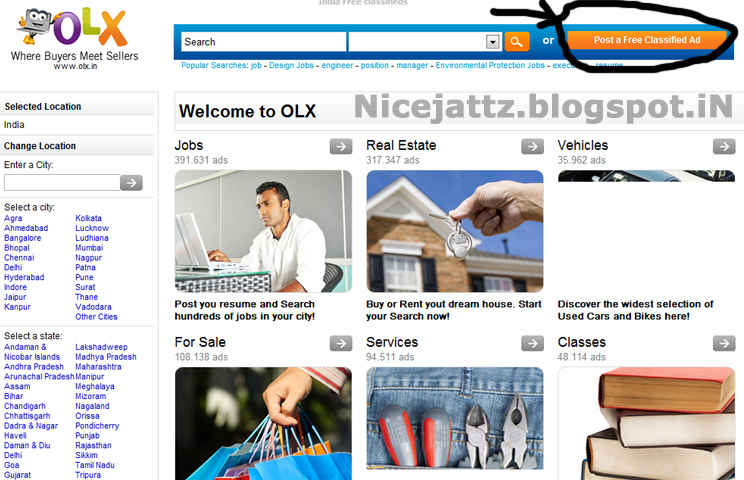
1. Search on google  ( Post a ad for free )


2. Click on any link  ( I click on first link olx.in)

3.Then open the site


4.  Click on Post a free classified Ad and a new page open


5. Choose the category  where you want to post the Ad

6. Fill the full information and click on post you have done it

Recomandations
  1. Fill the full information
  2. fill the correct information
  3. Use correct email and phone number

Take some time to comment on this post
and like us on social sites