Showing posts with label Computer software Recommendation. Show all posts

Wednesday, 9 October 2013

how to control media player with hand gestures in laptop

Hello friends are feel boring to press button to listen the music watch the videos,Now no need to worry because a new software name flutter is amazing its to easy to operate the music and videos play/pause next/previous with your hand only just move your hand to operate your music and video.This software use your web cam for gesture,if webcam in you pc then you can also use this software in your pc also.
Now what you have to do
First of all you have to download the software its just 3.5 mb,You can download this app from the flutter official site
https://flutterapp.com/home/


How to control :
If you want to play/pause the song just put your hand front of the camera 1-6 ft as shown in the image.
how to control media player with hand gestures
So now if you want to play next track you have to do like this
how to control media player with hand gestures

And if you want to play previous track You have to do like this
how to control media player with hand gestures
How it works
Flutter user you web cam as a input device else you will know in image


Wednesday, 25 September 2013

How to install power ISO in windows step by step

power iso instatallationHello my friends today I will tell you that how to install power ISO in window. Power ISO is a powerful CD / DVD / BD image file processing tool, which allows you to open, extract, burn, create, edit, compress, encrypt, split and convert ISO files, and mount ISO files with internal virtual drive. It can process almost all CD / DVD / BD image files including ISO and BIN files. Power ISO provides an all-in-one solution. You can do everything with your ISO files and disc image files.


Steps to install power ISO

Download power iso from the original site of power iso
http://www.poweriso.com/download.htm
after downloading the software click on software icon and a pop up open click on yes button.
Then the term box is open read all the terms of software before installation. Then click on I Agree button
power iso instatallation
Then you have to click on install button @ if you want to change the installation path click on browse button 
power iso instatallation
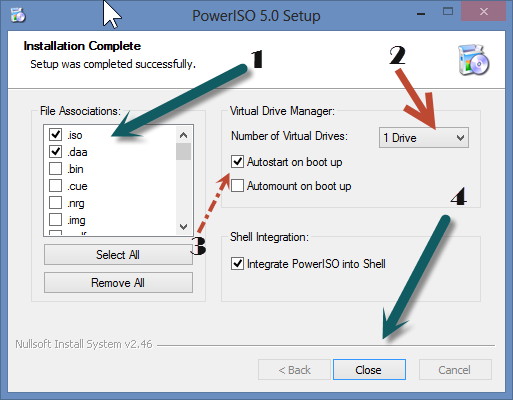
Then Click on next and you see a window here is 4 options I highlight in image
power iso instatallation
  1. 1  Select the files which you want to open with power iso.
  2. 2 Select the virtual drives.
  3. 3 Check the box so your power ISO start when your windows start.
  4. 4 Click on close button


So your POWER ISO is installed. Please share our post and like us .

Saturday, 27 October 2012

Power Up Your Desktop with Pokki

Pokki is one of the newer and more impressive applications in the technological world. This is an installer that allows computer users access to a range of web apps from their PC without too much trouble. Pokki has been extensively developed, but they are still urging developers to get on board to help develop further. There are plenty of features available to computer users with a few simple clicks of a button.


Installation of Pokki

There are lots of basic video demonstrations of the installation process. The installation process is incredibly simple and even the less technical computers will not have any problems installing it quickly and easily. Pokki is an application that can be installed by anyone and used by anyone! Pokki is certainly one of the easier applications when it comes to the installation process.
Pokki in use


The ease of use relating to applications is something that gets a lot of focus. The Future of Web Apps conference is one where people can get to grips with the best and newest web apps and applications. One of the sponsors of the event was Pokki, promoting the launch of their new product, which is likely to be a huge hit with all people that love technical gadgets.

Using the Pokki application is incredibly easy. With step by step instructions related to the installation and general use of the application, it’s hard to take a wrong turn. In fact, video sites like YouTube already have some in depth instructional videos for anyone that is having problems.

The main problem that people are finding is that the range of operating systems supported is not particularly extensive. For the moment, the Pokki application will only be installed on PCs using the Windows operating system. Over time, Pokki is looking to release new versions of their application, which will hopefully support operating systems such as the older versions of windows and of course; OSX.


The construction of the Pokki setup is what makes it really easy to use. Using a combination of HTML5, CSS3 and JavaScript, the application can do everything it needs to impress users. That being said, the app also provides enough flexibility so that new developers can be getting involved. Items like FaceBook, Gmail and Twitter are all easy to use using the Pokki application. Of course, there are plenty of other applications that can be run using the Pokki application; it is simply down to personal preference.

Pokki official site is in downlinks or click here

Sunday, 19 August 2012

Best music player for PC and Laptop KMPlayer


KMPlayer is a lightweight audio and video player for Windows that supports a wide range of different file formats, including AVI, ASF, WMV, AVS, FLV, MKV, and many more.
About :
Choosing a multimedia player used to be a real no-brainer. However, during recent times the raft of new features and updates added to classic media players like Winamp, Windows Media Player, and even iTunes have left the apps increasingly bloated. For those looking for a fresh alternative to these ballooning apps,
KMPlayer could be your ticket.

Like similar app UMPlayer, KMPlayer has a small desktop footprint and its minimalist interface makes video playback quick and hassle-free. The player's interface is fully skinable, and there are some nice aesthetic touches, such as the changing of colour on the player with every new track.

There are all sorts of options to help you pimp and customize KMPlayer, such as visualizations, plug-ins and playback options. But the beauty of KMPlayer is that these are turned on at your request rather than being forced upon you at the outset.

KMPlayer handles both audio and video, and supports a wide range of different formats, meaning that once installed, you should never need to touch another player. Video playback is particularly impressive thanks to the range of processing tools available that allow you to sharpen, change picture properties, apply filters and even make video captures from within the program.

If you're looking for a customizable, light yet powerful video player, KMPlayer is exactly what you need.
ScreenShots:


Recent changes :
Supports 3D Formats. (Side-By-Side, Top-and-Bottom) to (Anaglyph, Interlaced)
Supports 10-bit H.264. (Libcodec.dll)
Supports Intel Widi
Added video codec "DV5P"
Add new function album art (Thumnail image extraction from FLAC file)
Thumbnail image display enhancement when playing audio files. (MP3, FLAC, WMA)
Fixed ColorSpace bug
Fixed Intel Codec H.264
Fixed Winamp plugin
Error correction of images infected with malicious codes. (EIP register Corruption Vulnerability. Provided: KISA)
Fixed view as a desktop mode in Windows 7
Fixed improper load of Album Art bug
Correction of screen display error when using EVR(C/A) - if you skip from the WMV file.
Fixed KMP HTTP Reader
AAC codec Parser error correction from MOV file
MKV Skip Problem

Official site